

IO#
The synkit.IO module provides format-conversion utilities for reaction informatics.
It helps you move between string-based representations (SMILES/SMARTS) and graph-based
representations used throughout SynKit, including ITS graphs and DPO rules in GML.
Supported conversions include:
Reaction SMILES / Reaction SMARTS (string templates)
ITS (Imaginary Transition State) graphs for reaction-center analysis
GML (Graph Modeling Language) rules for DPO-style rewriting workflows
Aldol Reaction Example#
Below is an aldol condensation between an aldehyde and a ketone.

Figure: Aldol condensation between an aldehyde and a ketone.
Conversion to Reaction SMARTS#
Use rsmi_to_rsmarts() to transform a reaction SMILES/SMARTS string
into a reaction SMARTS template. This step is useful when you want a normalized,
atom-typed SMARTS representation for matching and rule construction.
 1from synkit.IO import rsmi_to_rsmarts
 2
 3template = (
 4    '[C:2]=[O:3].[C:4]([H:7])[H:8]'
 5    '>>'
 6    '[C:2]=[C:4].[O:3]([H:7])[H:8]'
 7)
 8
 9smart = rsmi_to_rsmarts(template)
10print("Reaction SMARTS:", smart)
Example output
Reaction SMARTS: "[#6:2]=[#8:3].[#6:4](-[H:7])-[H:8]>>[#6:2]=[#6:4].[#8:3](-[H:7])-[H:8]"
Conversion to ITS Graph#
Use rsmi_to_its() to convert a reaction SMILES/SMARTS string into
an ITS graph. Set core=True to restrict the output to the reaction center
only (a compact view that highlights changed bonds and directly participating atoms).
 1from synkit.IO import rsmi_to_its
 2from synkit.Vis import GraphVisualizer
 3
 4rsmi = (
 5    '[CH3:1][CH:2]=[O:3].'
 6    '[CH:4]([H:7])([H:8])[CH:5]=[O:6]'
 7    '>>'
 8    '[CH3:1][CH:2]=[CH:4][CH:5]=[O:6].'
 9    '[O:3]([H:7])([H:8])'
10)
11
12viz = GraphVisualizer()
13
14# Full ITS graph
15full_graph = rsmi_to_its(rsmi, core=False)
16viz.visualize_its(full_graph, use_edge_color=True)
17
18# Reaction-center-only ITS graph
19core_graph = rsmi_to_its(rsmi, core=True)
20viz.visualize_its(core_graph, use_edge_color=True)
Example output
Figure A: Full ITS graph
Figure B: Reaction-center ITS graph
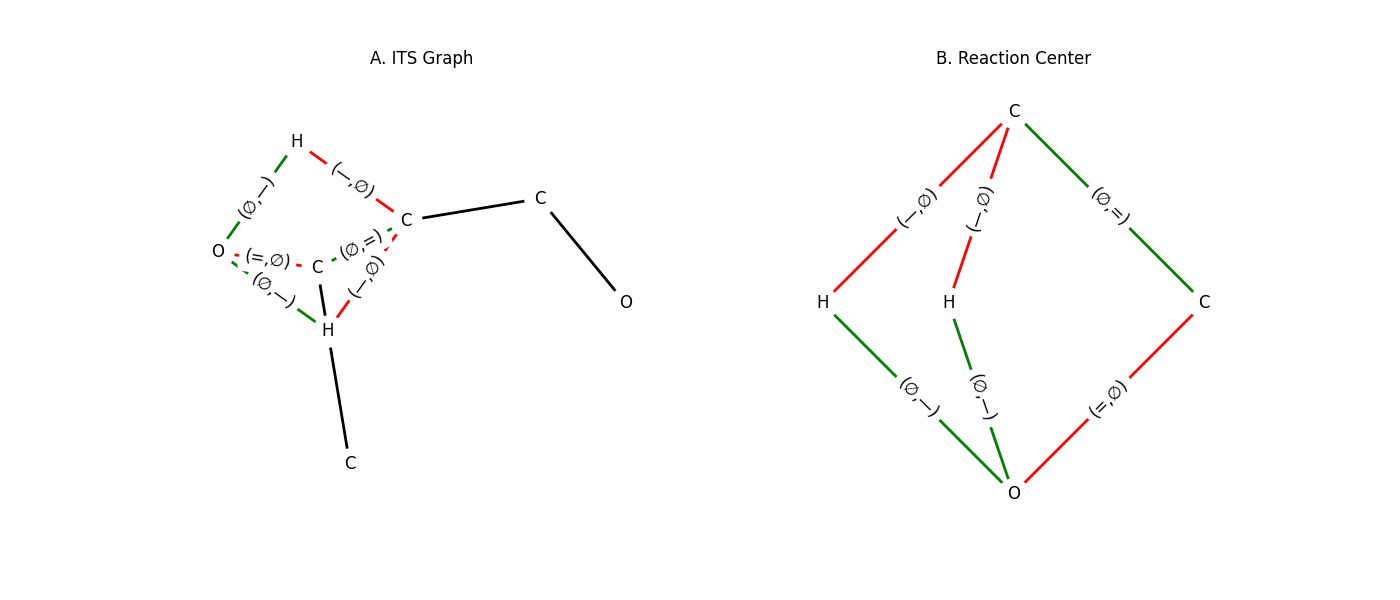
Figure: (A) Full ITS graph and (B) reaction-center-only ITS graph for the aldol condensation.
EF-SMIRKS and Electron-Pushing Descriptors#
An EF-SMIRKS string combines a partially atom-mapped reaction SMILES with
a hyphen-form electron-flow code after a space. Each flow step has the form
source-target and steps are separated with semicolons. SynKit preserves
the maps referenced by the flow code, completes atom mapping for every other
atom, and emits both generic EPD and Lewis-wavefunction-aware epd_lw.
 1from synkit.IO import ef_smirks_to_epd, epd_to_ef_smirks
 2
 3ef_smirks = (
 4    "C[C:10](C)(CO[N+]([O-])=O)[CH2:20][O:21]>>"
 5    "C[C:10](CO[N+]([O-])=O)C.[CH2:20]=[O:21] "
 6    "21-20,21;10,20-20,21;10,20-10"
 7)
 8
 9result = ef_smirks_to_epd(ef_smirks)
10complete_aam = result["complete_aam"]
11epd = result["epd"]
12epd_lw = result["epd_lw"]
13
14restored = epd_to_ef_smirks(complete_aam, epd)
15assert restored.endswith("21-20,21;10,20-20,21;10,20-10")
epd uses generic bond labels, while epd_lw derives Sigma and
Pi edits from the local ITS bond-order change. For the example above:
[
    ["LP-/Pi+", [21], [20, 21]],
    ["Sigma-/Pi+", [10, 20], [20, 21]],
    ["Sigma-/LP+", [10, 20], [10]],
]
The reverse helper accepts either generic EPD or typed epd_lw records and
reconstructs the EF-SMIRKS flow code. The helpers are available from both
synkit.IO and synkit.IO.conversion.
Conversion to DPO Rule (GML)#
Convert reaction templates or ITS graphs into DPO rules encoded in GML. Two common paths are supported:
smart_to_gml()— convert a reaction SMARTS/SMILES template to GMLits_to_gml()— convert an ITS graph to GML
Key options:
core=Trueincludes only the reaction center (recommended for compact rules)useSmiles=Truetreats the input string as SMILES (instead of SMARTS)
 1from synkit.IO import (
 2   rsmi_to_its,
 3   smart_to_gml,
 4   its_to_gml,
 5   save_text_as_gml,
 6   load_gml_as_text,
 7)
 8
 9reaction = (
10   '[CH3:1][CH:2]=[O:3].'
11   '[CH:4]([H:7])([H:8])[CH:5]=[O:6]'
12   '>>'
13   '[CH3:1][CH:2]=[CH:4][CH:5]=[O:6].'
14   '[O:3]([H:7])([H:8])'
15)
16
17# Option 1: Direct template → GML
18gml_rule_1 = smart_to_gml(reaction, core=True, useSmiles=False)
19
20# Option 2: Template → ITS → GML
21its_graph = rsmi_to_its(reaction, core=True)
22gml_rule_2 = its_to_gml(its_graph, core=True)
23
24# Save to disk
25save_text_as_gml(gml_text=gml_rule_2, file_path="aldol_rule.gml")
26
27# Load back
28loaded_rule = load_gml_as_text("aldol_rule.gml")
29print(loaded_rule)
Example output
rule [
  ruleID "aldol_rule"
  left [
    edge [ source 2 target 3 label "=" ]
    edge [ source 4 target 7 label "-" ]
    edge [ source 4 target 8 label "-" ]
  ]
  context [
    node [ id 2 label "C" ]
    node [ id 3 label "O" ]
    node [ id 4 label "C" ]
    node [ id 7 label "H" ]
    node [ id 8 label "H" ]
  ]
  right [
    edge [ source 2 target 4 label "=" ]
    edge [ source 3 target 7 label "-" ]
    edge [ source 3 target 8 label "-" ]
  ]
]
See Also#
synkit.Vis— visualization utilitiessynkit.Graph— graph data structures and transformations